

fastf1 is the de-facto standard library for Formula 1 data in Python. The fastf1 project has done much for the F1 data community. tif1 started as a personal project with a different philosophy in a few areas. These areas are data-fetch granularity, API rate limits, ready-made charts, CDN-based access, and extra data.
tif1 keeps a fastf1-compatible API, so the two libraries feel familiar side by side. This fact-checked comparison helps with that decision.
Comparison at a Glance
1. Fetch Only the Necessary Data — No Full-Session Downloads
The fastf1 approach
fastf1 is session-oriented by design. session.load() fetches the entire session up front:
The tif1 approach: lazy and fine-grained
Intif1, a session is a lightweight object. Data is fetched only when a property is accessed, and only the files needed for that access:
Why it matters
- Faster iteration — first results appear in seconds, not minutes.
- Disk space — the cache stores only the files actually used.
- Bandwidth and energy — fewer transferred bytes reduce the environmental load, especially at scale.
- Predictable cost — one lap equals one file. One session needs only a few files.
2. No API rate limits — a verified 500 requests/hour ceiling on fastf1’s data source
The 500 requests/hour limit, verified
fastf1 obtains its data from two upstream sources:
- The F1 live-timing API (unofficial, for telemetry and timing feeds).
- The Ergast-compatible jolpica-f1 API (open source, for lap times, results, and historical data). It replaces the old Ergast API, which was limited to roughly 250 requests per hour per IP.
- Burst limit: 4 requests per second
- Sustained limit: 500 requests per hour
HTTP 429 Too Many Requests with the message “Request was throttled”. The Terms of Use add that abuse or excessive use may result in temporary or permanent blocking. The same terms note that the limits decrease in the future as token-based access rolls out.
The live-timing endpoints used for telemetry are not a public service. They are known to throttle and block clients that make too many requests.
When the limit matters
The 500 requests/hour ceiling is a real constraint worth planning around. Load patterns that can approach it include:- loops over an entire season (24 weekends × several sessions),
- comparisons of a full grid across multiple races,
- backtests or model training on many sessions,
- background jobs that warm a cache.
tif1 for the app at tracinginsights.com/analysis.
Why tif1 has no rate limits
tif1 does not depend on those APIs for distribution. It serves pre-processed static JSON files from public GitHub data repositories (TracingInsights/{year}). Distribution runs through jsDelivr (primary), Hugging Face buckets (fallback), and StaticDelivr (backup). These free CDNs distribute open-source software worldwide.
The result:
- No API keys or accounts
- No per-user or per-IP request quotas
- No throttling on burst traffic
- Automatic CDN failover, retries, and a circuit breaker built in
- SQLite and in-memory LRU caching, so repeat accesses do not hit the network
3. Charts Included — 22 Optional One-Call Chart Helpers
Many users build visualizations by hand from fastf1’s raw DataFrames. For quick, repeatable plots,tif1 additionally bundles plot_*() helpers that handle the loading, filtering, and styling:
Real examples from the tif1 tutorials
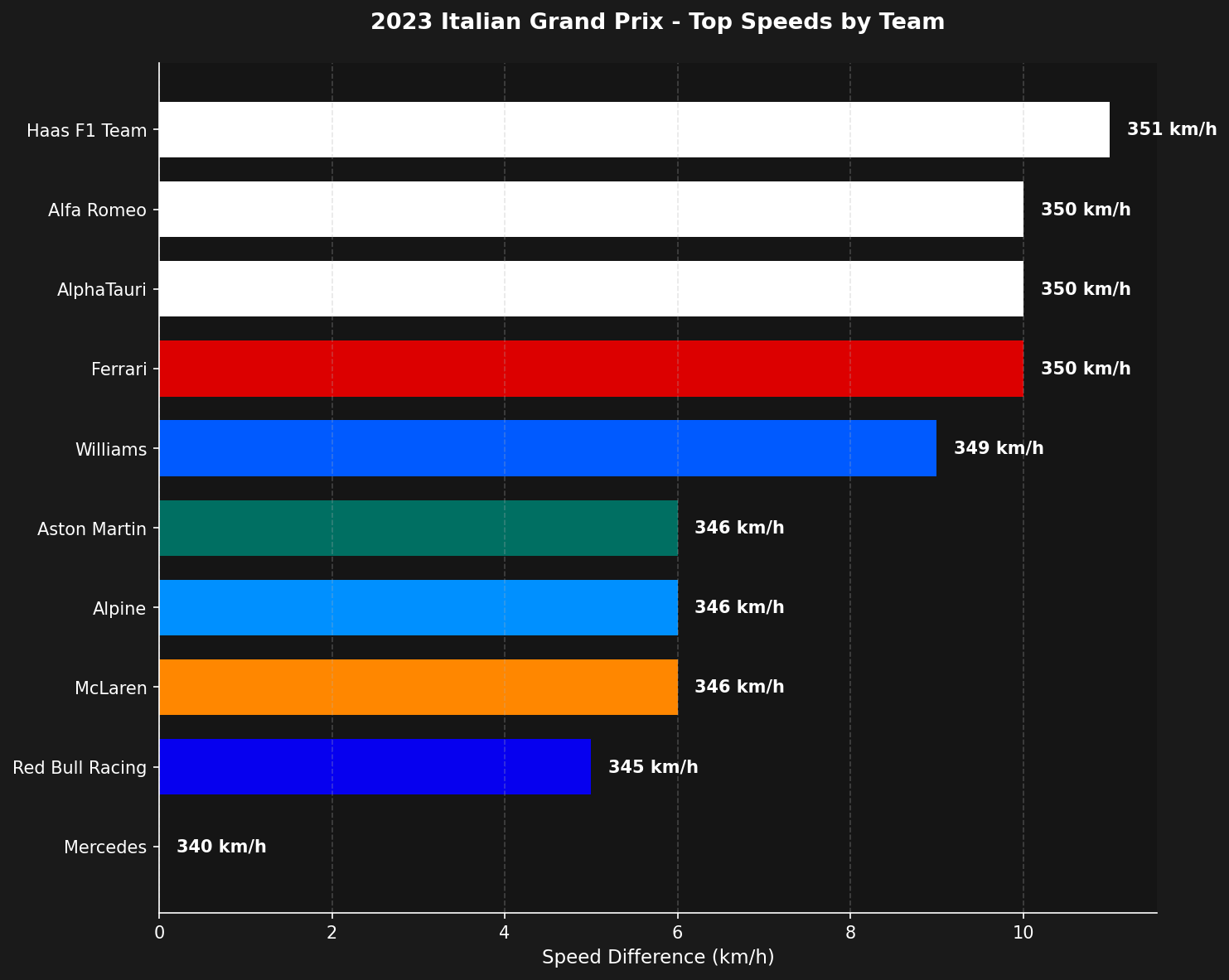
The full chart family
Every chart accepts shared filters: year, event, session, drivers/teams, save path, and DPI. Every chart also has a matching tutorial in the Tutorials section.
4. Works from anywhere — no IP restrictions
IP restrictions on the live-timing endpoints
fastf1’s telemetry flows come from the official F1 live-timing infrastructure, which is an internal service. Community discussions report that these endpoints reject requests from some sources:- VPNs are sometimes blocked — common VPN/proxy IP ranges may be rejected.
- Data-center and cloud IPs are sometimes blocked — a VPS, cloud function, or CI runner can require workarounds.
- Residential-IP workarounds appear in discussions for users who encounter these blocks.
The tif1 approach: global CDNs, no IP checks
tif1 serves files from StaticDelivr and jsDelivr, with Hugging Face buckets as a last-resort backup. These free CDNs serve millions of websites every day. CDNs are built to serve content to the entire internet, so there are:
- No IP allowlists or blocks
- No VPN/proxy detection
- No residential-IP requirements
- No keys, cookies, or sessions
5. Extra data — mini sectors and more
Mini-sector data
Formula 1 timing divides a lap into 3 sectors. Each sector divides into 8 mini-sectors — 24 mini-sectors around the lap. Mini-sector timing shows where drivers gain and lose time more precisely than the three conventional sectors. Teams and broadcasters use it for detailed performance analysis. fastf1’s public API focuses on lap timing, telemetry, and results. The TracingInsights data pipeline behind tif1 provides a few extras outside that scope:- Race-control messages include the affected mini-sector in the
Sectorcolumn (1-24), for example a yellow flag in mini-sector 12. Flags are tracked per mini-sector, not just per conventional sector. - Lap data is enriched with mini-sector splits sourced from OpenF1 for per-lap resolution below the S1/S2/S3 level.
A few more extras
Honest trade-offs: when fastf1 still makes sense
Both libraries have strengths, and fastf1 remains the better choice in a few situations:- Live timing. tif1 is an archive library (2018-current). Real-time lap and telemetry data during a live session needs fastf1.
- Freshest data. tif1 data is published ~30 minutes after a session ends, versus ~20-25 minutes for fastf1. The 2-5 minute gap pays for enrichment and processing.
- Deep fastf1-internal dependencies. A codebase that relies on fastf1 internals beyond the documented API surface (for example
fastf1.ergast,fastf1.livetiming) needs those specific modules. tif1 does not include them.
Migration
Because tif1 keeps the fastf1-compatible schema (same column names, types, and ordering), migrating is typically a one-line import change:Quickstart
Load a first session in under 30 seconds.
Charts API
Browse all 22 native chart functions.
Migration Guide
Move an existing fastf1 project to tif1.
Tutorials
See tif1 charts applied to real race analysis.